A guide to SFF PCs (WIP)
Bensuperpc December 27, 2025 [Hardware] #Features #SFF #Tiny #ThinkcentreCAN bus under Linux (WIP)
Benchmarking Webp format (WIP)
Tutorial on FFMPEG (WIP)
RTL9210 Firmware and Tools
Comparison of SSDs
Evolutions of CPUs (WIP)
Mesa GPU drivers
Deploy Traefik as a reverse proxy with Kubernetes
C++ Code Coverage with CMake and GCOVR
A guide to SFF PCs (WIP)
A Guide to SFF PCs
Welcome to the guide to SFF PCs.
Introduction to SFF PCs
In this section, we will explore different aspects of SFF PCs, including their components and software, with a focus on Linux and open-source solutions, Windows have often lower lifetime support and proprietary software.
What is an SFF PC?
An SFF PC is a Small Form Factor PC, it is usually very compact, power-efficient, and can be used for various purposes, they are commonly found in schools, offices, and home servers.
Why should I choose an SFF PC?
There are many reasons to choose an SFF PC:
- Compact: SFF PCs are very small and can fit almost anywhere. (~1-3 liters)
- Power-efficient: They consume less power, especially models with T or U series processors.
- Affordable: SFF PCs are often cheaper than traditional full desktop PCs, especially on the second-hand market.
Why shouldn't I choose an SFF PC?
There are also some drawbacks to consider:
- Limited upgradeability: Many SFF PCs have limited upgrade options, and some components are not replaceable.
- Fewer ports: Compared to larger desktops, SFF PCs typically have fewer connectivity options.
- Performance constraints: Due to their small size and thermal limitations, performance may be lower than full-sized PCs.
- Proprietary components: Some models use proprietary parts, making repairs and upgrades more difficult.
What are some examples of SFF PCs?
Here are some well-known brands and models:
- Lenovo ThinkCentre: M73 Tiny, M710q, M720q, M70q gen 1, M75q gen 1, M90q gen 3
- Dell OptiPlex: 3040, 3050, 3060, 3070, 5040, 5050, 5060, 5070
- HP EliteDesk: 800 G1 Mini, 800 G2 Mini
- Intel NUC: NUC6i3SYH, NUC6i5SYH, NUC6i7KYK, NUC7i3BNH, NUC7i5BNH, NUC7i7BNH
- Zotac ZBOX: CI660 Nano, CI640 Nano, CI620 Nano, CI540 Nano, CI520 Nano, CI327 Nano
- Asus VivoMini: UN65, UN65U, UN65U-M023M, UN65U-M021M, UN65U-M022M, UN65U-M020M
Many other brands and models are available on the market.
For second-hand options, i recommend Lenovo, Dell, and HP. These brands offer plenty of affordable models that are often upgradable (RAM, SSD, CPU, PSU) and great Linux compatibility.
ARM SFF PCs
SFF PCs are usually x86-based, but ARM-based SFF PCs have been gaining popularity in recent years, they are generally cheaper and more power-efficient but come with limitations:
- Limited software compatibility: They are not compatible with traditional x86/PC software and drivers can be missing or outdated.
- Limited upgrade options: Components are often soldered and non-replaceable.
- Lower performance: Compared to x86 counterparts, ARM-based SFF PCs may struggle with demanding tasks (encoding, gaming, etc.).
In this guide, we will focus on x86 SFF PCs and the Raspberry Pi.
SFF PC Components
In this section, we will look at the main components of SFF PCs.
CPU (Central Processing Unit)
I recommend using socketed CPUs, as they allow for future upgrades to more powerful models (within the same TDP range), for example on Thinkcentre tiny M720q, you can upgrade from a slow Intel Celeron G4900T to a powerful Intel i9-9900T without any issues (somtime just need update of Intel ME and BIOS).
Most SFF PCs come with 35W or 65W CPUs, i strongly recommend avoiding CPUs with a higher TDP than what the system supports, as this can cause overheating and potentially damage the motherboard or PSU.
Many modern software utilizes AVX2 instructions, which can significantly boost performance in tasks like video encoding/decoding, compression, encryption, etc. Every CPU since Intel Haswell (2013) and AMD Zen (2017) supports AVX2, except for some low-end models like Intel Celeron/Pentium/Atom and AMD Athlon.
Intel CPU generations
| Brand | CPU arch | CPU Gen | Socket | RAM Type | Max RAM | Year | Exemple of SSF PC | Remarks |
|---|---|---|---|---|---|---|---|---|
| intel | Core | Core 2 | LGA775 | DDR2-DDR3 | 8GB | 2006-2007 | Huge performance improvement over Netburst | |
| intel | Penryn | Core 2 | LGA775 | DDR2-DDR3 | 8GB | 2007-2008 | Better perf efficiency | |
| intel | Nehalem | 1st Gen | LGA1156 | DDR3 | 16GB | 2008-2009 | SMT, Memory controller on CPU and monolithic quad-core | |
| intel | Westmere | 1st Gen | LGA1156 | DDR3 | 16GB | 2010-2011 | Better perf efficiency | |
| intel | Sandy Bridge | 2nd Gen | LGA1155 | DDR3 | 32GB | 2011-2012 | M72 tiny | Add AVX support, good iGPU and greatly improve perf |
| intel | Ivy Bridge | 3rd Gen | LGA1155 | DDR3 | 32GB | 2012-2013 | M72 tiny | Better perf efficiency |
| intel | Haswell | 4th Gen | LGA1150 | DDR3 | 32GB | 2013-2014 | M73 tiny | Support AVX2 and FMA3, improve perf |
| intel | Broadwell | 5th Gen | LGA1150 | DDR3 | 32GB | 2014-2015 | Better perf efficiency | |
| intel | Skylake | 6th Gen | LGA1151 | DDR3-DDR4 | 64GB | 2015-2016 | M700, M710q | HEVC/VP9 8-bit hardware enc/dec, iGPU vulkan and NVMe support |
| intel | Kaby Lake | 7th Gen | LGA1151 | DDR4 | 64GB | 2016-2017 | M710q | HEVC/VP9 10-bit hardware enc/dec support |
| intel | Coffee Lake | 8-9th Gen | LGA1151 | DDR4 | 64GB | 2017-2019 | M720q | Increase core count and remove SMT on 9th gen CPUs |
| intel | Comet Lake | 10th Gen | LGA1200 | DDR4 | 128GB | 2020-2021 | M70q gen 1 | Re-add SMT on most CPUs |
| intel | Rocket Lake | 11th Gen | LGA1200 | DDR4 | 128GB | 2021-2022 | M70q gen 2 | Add AVX-512 support and better perf |
| intel | Alder Lake | 12th Gen | LGA1700 | DDR4-DDR5 | 256GB | 2021-2022 | M70q gen 3 | Remove AVX-512, Pcore and ECore, AV1 hard dec and improve IPC |
| intel | Raptor Lake | 13-14th Gen | LGA1700 | DDR5 | 256GB | 2022-2023 | M70q gen 4, 5 | More Ecores and cache |
| intel | Arrow Lake | 15th Gen | LGA1700 | DDR5 | 256GB | 2024-2025 | M70q gen 6 | Remove SMT, gain big perf per thread, AV1 encode, Ray Tracing |
| intel | Nova Lake | 16th Gen | LGA1851 | DDR5 | ? | 2026 ? | (Re)add AVX10.2/AVX512 support |
AMD CPU generations
| Brand | CPU arch | CPU Gen | Socket | RAM Type | Max RAM | Year | Exemple of SSF PC | Remarks |
|---|---|---|---|---|---|---|---|---|
| AMD | Excavator | 4th Gen | AM4 | DDR4 | 32GB | 2015-2016 | ||
| AMD | Zen | 1st Gen | AM4 | DDR4 | 64GB | 2017-2018 | M715Q | Huge performance improvement and on pair with intel Haswell CPUs |
| AMD | Zen+ | 2nd Gen | AM4 | DDR4 | 64GB | 2018-2019 | ||
| AMD | Zen 2 | 3rd Gen | AM4 | DDR4 | 128GB | 2019-2020 | M70q gen 1/2 | On pair with intel Skylake CPUs and fix most of the issues of Zen |
| AMD | Zen 3 | 4th Gen | AM4 | DDR4 | 128GB | 2020-2021 | M70q gen 2 | Improve IPC and power efficiency |
| AMD | Zen 4 | 5th Gen | AM5 | DDR5 | 128GB | 2021-2022 | Add AVX-512 support, better IPC and RDNA iGPU | |
| AMD | Zen 5 | 6th Gen | AM5 | DDR5 | 192GB | 2022-2023 | M70q gen 5 | Slightly improve IPC and AVX-512 support perf |
I recommend using Intel Alder Lake, AMD Zen 3, or newer CPUs, they offer nice performances and support modern features like NVMe, iGPU Vulkan, HEVC 10-bit hardware encoding/decoding, AVX2, etc... However, if you’re on a budget, Intel Coffee Lake, AMD Zen 2 remains a good option due to the low price of the CPUs and relatively good performance, older CPUs like Intel Haswell and AMD Excavator often not worth it due to their low performance, lack of modern features (NVMe, HEVC or Vulkan etc...) and microcode updates (security and bug fix for CPU).
GPU (Graphics Processing Unit)
Most SFF PCs have only an integrated GPU, they are sufficient for light GPU tasks and are very power efficient, some SFF PCs can add a dedicated GPU (like M720Q/M920Q), these are low-profile and use PCIe x4/x8 lanes, which can be useful for light gaming, networking, etc... Ensure the PSU and motherboard can support the PCIe card's power consumption.
I recommend Intel iGPUs from Skylake or newer (Intel HD 500 series and newer) or AMD iGPUs from Zen 2 or newer (Vega and newer).
These GPUs support modern graphics APIs such as OpenGL 4.6 and Vulkan (up to 1.4 on Linux via Mesa), and provide hardware acceleration for common video codecs like AVC/H.264, HEVC/H.265, and VP9.
AV1 hardware decoding is available on Intel Alder Lake or newer, and on AMD RDNA2/Zen 4-based iGPUs or newer, for encoding, Intel Arc GPUs, Arrow lake or AMD RDNA3-based GPUs are required.
Vulkan (1.3/1.4) has become increasingly important in recent years, especially with the emergence of Vulkan Video extensions, which aim to improve efficiency by reducing CPU overhead compared to traditional APIs such as VA-API or VDPAU.
RAM (Random Access Memory)
SFF PCs typically have two RAM slots, supporting DDR3, DDR4, or DDR5 RAM depending on the CPU and motherboard, the maximum capacity usually ranges from 16GB to 256GB, i recommend using two identical RAM sticks to enable dual-channel (double the bandwidth), you can use higher-frequency RAM than what the CPU officially supports, the RAM will downclock to maximum supported frequency by memory controller.
Most SSF PCs support SO-DIMM (RAM in Laptop), which is smaller than standard DIMM RAM, but they have similar performances.
I recommend using DDR4 or DDR5 RAM, as it is the most common, well-supported, here are some general recommendations (in 2025):
- 4GB: Barebones Linux server, light applications. (small website hosting, router, NAS)
- 8GB: Light to medium applications. (web browsing, office work, small servers)
- 16GB: Recommended for most use cases. (basic game server, CI build server, light development)
- 32GB+: Optimal for multitasking. (AAA gaming, video/photo editing, rendering)
- 64GB+: Heavy multitasking. (virtualization, machine learning, scientific computing, CAD)
Storage
SFF PCs have four main storage options (depending on the model):
- M.2 NVMe SSD: Very fast and present in most SFF PCs since 2015, the best choice.
- M.2 SATA SSD: Uses the same connector as NVMe but operates at SATA speeds. (e.g., ThinkCentre M700)
- 2.5" SATA SSD: Slower than M.2 NVMe but a good alternative if M.2 is unavailable.
- 2.5" SATA HDD: Very slow and generally not recommended, but can be replaced with an SSD.
- Onboard eMMC: Soldered storage on the motherboard, avoid it, it is slow, limited and non-replaceable.
I recommend using M.2 NVMe SSDs, be mindful of the size (2242, 2260, 2280), connector type (B, M, B+M), and whether it's single or double-sided.
You can use SSDs PCIe 4.0 x4 on PCIe 3.0 x2 or x4 slots and vice versa, the SSD will automatically adjust to the maximum speed supported by both parts.
Ports
All SFF PCs have a limited number of ports, ensure that your chosen SFF PC has enough ports for your needs, some models support expansion for additional ports (most Lenovo ThinkCentre tiny models).
Common ports include:
- USB type A: For peripherals, storage, mouse, keyboard, etc...
- USB type C: Same as USB type A, sometimes video output and/or thunderbolt support
- HDMI/DisplayPort/VGA: For monitors
- Ethernet: For networking
- Audio jacks: For headphones, microphones, speakers
PSU (Power Supply Unit)
Most SFF PCs use an external power supply, often with a proprietary connector.
Here are general guidelines:
- 45W: 15W CPU
- 65W: 35W CPU
- 90W: 65W CPU or 35W CPU + DVD drive/expansion
- 135W: 65W CPU + 45W GPU or 100W CPU
You can gain small performance boosts by using an overpowered PSU, especially since Intel Commet Lake and newer CPUs.
Motherboard
Like the PSU, most SFF PCs have a proprietary motherboard, sometimes, you can replace it with another model from the same brand (e.g., an M920Q motherboard in an M720Q), however, in most cases, it is best to stick with the original motherboard model.
Operating System
All SFF PCs x86-based are compatible with most operating systems (Linux, Windows, FreeBSD, even MacOS x86 etc...), i strongly recommend using Linux or FreeBSD due to its low resource usage, better performance, security, and compatibility with older hardware, some Linux distributions i recommend for SFF PCs.
Standard Linux distributions:
- Debian: Stable, well-supported, large software repository, update cycle of ~2 years
- Ubuntu: User-friendly, large community, based on Debian with GNOME desktop
- Arch Linux: Rolling release and cutting-edge software, highly customizable but high learning curve
- NixOS: Fully declarative and reproducible configuration, unique package management system
Lightweight Linux distributions:
- Lubuntu: Ubuntu with LXQt GUI
- Xubuntu: Ubuntu with XFCE GUI
- Stitaz: Extremely lightweight, can run on very old hardware but old kernels and software.
Multimedia-focused Linux distributions:
- OSMC: Lightweight media center distribution based on Debian
Lenovo thinkcentre SSF PCs
In this section, we will see the different models of Lenovo thinkcentre SSF PCs.
| Model | CPU | Chipset | SODIMM RAM² | PCIe | SSD/HDD ports | PSREF |
|---|---|---|---|---|---|---|
| M72 tiny | Sandy bdridge/Ivy bridge | Intel H61 | 2x 8GB 1600MHz DDR3 | - | 1x SATA | |
| M92 tiny | Sandy bdridge/Ivy bridge | Intel Q77 | 2x 8GB 1600MHz DDR3 | - | 1x SATA | |
| M73 tiny | Haswell | Intel H81 | 2x 8GB 1600MHz DDR3 | - | 1x SATA | |
| M83 tiny | Haswell | Intel Q85 | 2x 8GB 1600MHz DDR3 | - | 1x SATA | |
| M700q | Skylake | Intel B150 | 2x 16GB 2133MHz DDR4 | - | 1x SATA & 1x (Sata) | |
| M900q | Skylake | Intel Q170 | 2x 16GB 2133MHz DDR4 | - | 1x SATA & 1x M.2 NVMe | |
| M710q | Skylake/Kaby Lake | Intel B250 | 2x 32GB 2400MHz DDR4 | - | 1x SATA & 1x M.2 NVMe | |
| M910q | Skylake/Kaby Lake | Intel Q270 | 2x 32GB 2400MHz DDR4 | - | 1x SATA & 2x M.2 NVMe | |
| M720q | Coffee Lake | Intel B360 | 2x 32GB 2666MHz DDR4 | x8 Gen 3¹ | 1x SATA & 1x M.2 NVMe | |
| M920q | Coffee Lake | Intel Q370 | 2x 32GB 2666MHz DDR4 | x8 Gen 3¹ | 1x SATA & 1x M.2 NVMe | |
| M920x | Coffee Lake | Intel Q370 | 2x 32GB 2666MHz DDR4 | x8 Gen 3¹ | 1x SATA & 2x M.2 NVMe | |
| P330 | Coffee Lake | Intel Q370 | 2x 32GB 2666MHz DDR4 | x8 Gen 3¹ | 1x SATA & 2x M.2 NVMe | |
| M75q | AMD Zen 2 | AMD Pro 500 | 2x 32GB 2933MHz DDR4 | - | 1x SATA & 1x M.2 NVMe | |
| M75q Gen 2 | AMD Zen 3 | AMD Pro 500 | 2x 32GB 3200MHz DDR4 | - | 1x SATA & 1x M.2 NVMe | |
| M70q | Comet Lake | Intel H470 | 2x 32GB 2933MHz DDR4 | - | 1x SATA & 1x M.2 NVMe | |
| M80q | Comet Lake | Intel Q470 | 2x 32GB 2933MHz DDR4 | - | 1x SATA & 1x M.2 NVMe | |
| M90q | Comet Lake | Intel Q470 | 2x 32GB 2933MHz DDR4 | x8 Gen 3 | 1x SATA & 2x M.2 NVMe | |
| P340 | Comet Lake | Intel Q470 | 2x 32GB 2933MHz DDR4 | x8 Gen 3 | 1x SATA & 2x M.2 NVMe | |
| M70q Gen 2 | Rocket Lake/Comet Lake | Intel B560 | 2x 32GB 3200MHz DDR4 | - | 1x SATA & 1x M.2 NVMe | |
| M90q Gen 2 | Rocket Lake/Comet Lake | Intel Q570 | 2x 32GB 3200MHz DDR4 | x8 Gen 3 | 1x SATA & 2x M.2 NVMe | |
| P350 | Rocket Lake | Intel Q570 | 2x 32GB 3200MHz DDR4 | x8 Gen 3 | 1x SATA & 2x M.2 NVMe | |
| M80q Gen 3 | Alder Lake | Intel Q670 | 2x 32GB 4800MHz DDR5 | - | 1x SATA & 2x M.2 NVMe | |
| M90q Gen 3 | Alder Lake | Intel Q670 | 2x 32GB 4800MHz DDR5 | x8 Gen 4 | 1x SATA & 2x M.2 NVMe | |
| P360 | Alder Lake | Intel Q670 | 2x 32GB 4800MHz DDR5 | x8 Gen 4 | 2x M.2 NVMe | |
| M70q Gen 3 | Alder Lake | Intel Q670 | 2x 32GB 3200MHz DDR4 | - | 1x SATA & 1x M.2 NVMe | |
| M75q Gen 5 | AMD Zen 4 | AMD Pro 600 | 2x 32GB 5200MHz DDR5 | - | 2x M.2 NVMe | |
| M70q Gen 4 | Raptor Lake | Intel Q670 | 2x 32GB 5600MHz DDR5 | - | 2x M.2 NVMe | |
| M70q Gen 5 | Raptor Lake | Intel Q670 | 2x 32GB 5600MHz DDR5 | - | 2x M.2 NVMe | |
| M70q Gen 6 | Arrow Lake | Intel B860/Q870 | 2x 32GB 5600MHz DDR5 | - | 2x M.2 NVMe |
¹: You need proprietary riser card to use the PCIe slot
²: Maximum RAM supported is determined by CPU (memory controller) and BIOS, some configurations may support more RAM unofficially.
Tools
Lenovo Bios/UEFI simulator: Simulator
M710q and M910q
Ports
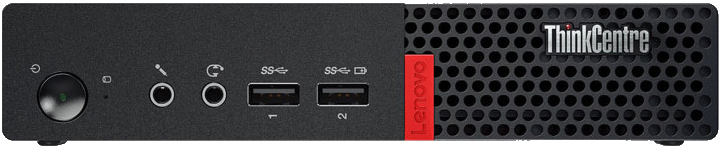
On the front:
- 2x USB 3.1 Gen 1
- 1x Audio headphone jack
- 1x Audio microphone jack
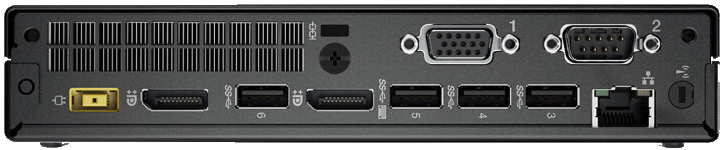
On the back:
- 4x USB 3.1 Gen 1
- 1x HDMI 1.4
- 1x DisplayPort 1.2a
- 1x Ethernet RJ45
- 1x Lenovo proprietary power connector
- 2x proprietary port for accessories (VGA, HDMI, DP, USB-C etc...)
The M710q/M910q does not support HDR through HDMI (1.4) or DisplayPort (1.2a) but 10bit color depth is supported.
CPU
The M710q/M910q supports all 6th and 7th generation Intel 35W CPUs (models with T suffix), i recommend 7th gen for HEVC 10-bit hardware encoding/decoding support.
RAM
The M710q/M910q have two DDR4 SODIMM slots with a maximum capacity of 32GB (2x16GB), the maximum frequency is 2133MHz or 2400MHz on 7th gen.
M720q, M920q and M920x
Ports
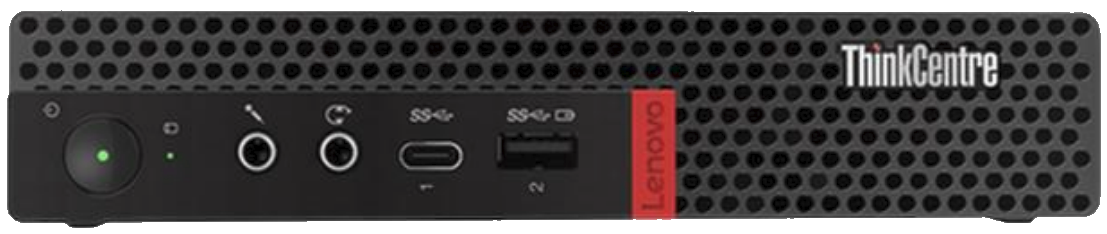
On the front:
- The power button
- 1x Audio microphone jack
- 1x Audio headphone jack
- 1x USB-C 3.1 Gen 1
- 1x USB 3.1 Gen 1
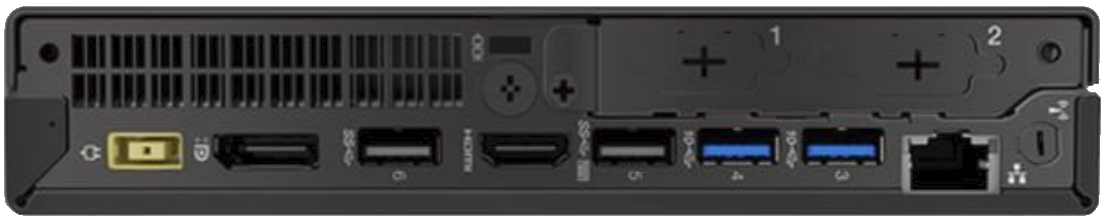
On the back:
- 1x Lenovo proprietary power connector
- 1x DisplayPort 1.2a
- 2x USB 3.1 Gen 1
- 1x HDMI 1.4
- 2x USB 3.1 Gen 2
- 1x Ethernet RJ45
- 2x port for proprietary accessories (VGA, HDMI, DP, USB-C etc...)
The M720q/M920q does not support HDR through HDMI (1.4) or DisplayPort (1.2a) but 10bit color depth is supported.
CPU
The M720q/M920q supports all 8th and 9th generation Intel 35W CPUs (models with T suffix), the i7-9900T is the most powerful CPU available for this model, but it is very expensive and hard to find, the i3-8100T, i3-9100T, i5-8500T, i5-8600T, i5-9500T, i5-9600T, i7-8700T, i7-9700T are far more common, affordable and still offer good performance.
Avoid Celeron and Pentium, they are pretty slow (missing AVX2, FMA3, etc...), do not use CPUs with a higher TDP than 35W (65W on M920x), this can cause overheating and potentially damage your motherboard (like VRMs) or PSU.
RAM
The M720q/M920q/M920x have two DDR4 SODIMM slots with a maximum capacity of 64GB (2x32GB), the maximum frequency is 2400MHz or 2666MHz on i5/i7 CPUs.
Storage
You have two storage options:
- M.2 NVMe PCIe 3.0: Only one slot and support PCIe x4 Gen 3
- 2.5" SATA: Slower but it be a good alternative if you need more storage or don't have an M.2 NVMe SSD
The the second M.2 slot missing NVMe on M720q/M920q, you can solder missing components to get working M.2 (SATA): https://github.com/badger707/m920q-dual-NVME
GPU
All compatible CPU have an integrated GPU, if it is not enough, you can add a low-profile GPU with proprietary PCIe riser card, you are limited with PCIe 3.0 x8 and 45W TDP (you also need 135W PSU).
PSU
The proprietary PSU used for the M720q has a 65W, 90W, 135W power rating, 90W is minimum when you use expansion cards or powerful CPU. (i7 or i9 CPU)
Expansion and accessories
The M720q supports multiple expansion options:
| Type | Model | Description |
|---|---|---|
| VGA Port Card | 01AJ935 | Add 1 VGA Port outputs |
| VGA Port Card | 5C50W00881 | Add 1 VGA Port outputs |
| Display Port Card | 01AJ937 | Add 1 Display Port outputs |
| HDMI Port Card | 01AJ938 | Add 1 HDMI Port outputs |
| USB-C Port Card | 01AJ939 | Add 1 USB-C Port outputs |
| Riser PCIe x8 | 01AJ940 | Add 1 PCIe x8 slot |
| COM RS232 Port Card | 04X2733 | Add 1 COM RS232 Port outputs |
| Vesa Mount | 4XF0N03161 | Vesa Mount + screws |
| Vesa Mount | SM10U47670 | Vesa Mount + screws |
| Vesa Mount | 01EF310 | Vesa Mount + screws |
| Vesa Mount | 01EF645 | Vesa Mount + screws |
| Vesa Mount | 5M10U49625 | Vesa Mount + screws |
| USB hub | 01EF647 | USB hub with RS232 |
| Wifi antenna | 00XJ126 | Internal Wifi antenna |
| Radiator with fan | 01MN633 | Radiator with fan |
| Radiator with fan | 01MN632 | Radiator with fan |
BIOS
To update the BIOS, you must update Intel Management Engine first, then update the BIOS, otherwise you risk boot loop with older BIOS versions.